
Chrome Manifest V3 · ActiveTab Only · Zero Tracking

Clean Markdown, Intact Tables & AI Threads Without All-Sites Tracking

Built by FlowBench Lab. Extract documentation, merged HTML colspan/rowspan & ARIA tables, and ChatGPT/Claude conversation turns into clean Markdown, Google Sheets TSV, or RFC 4180 CSV locally on the active tab you click.

Free core forever · Works on Chrome, Brave, Arc & Edge · Need browser-only paste cleanup? Open Free Table Cleaner →

Clipwell v1.1 — Active Tab Local Extractor
0 KB Telemetry
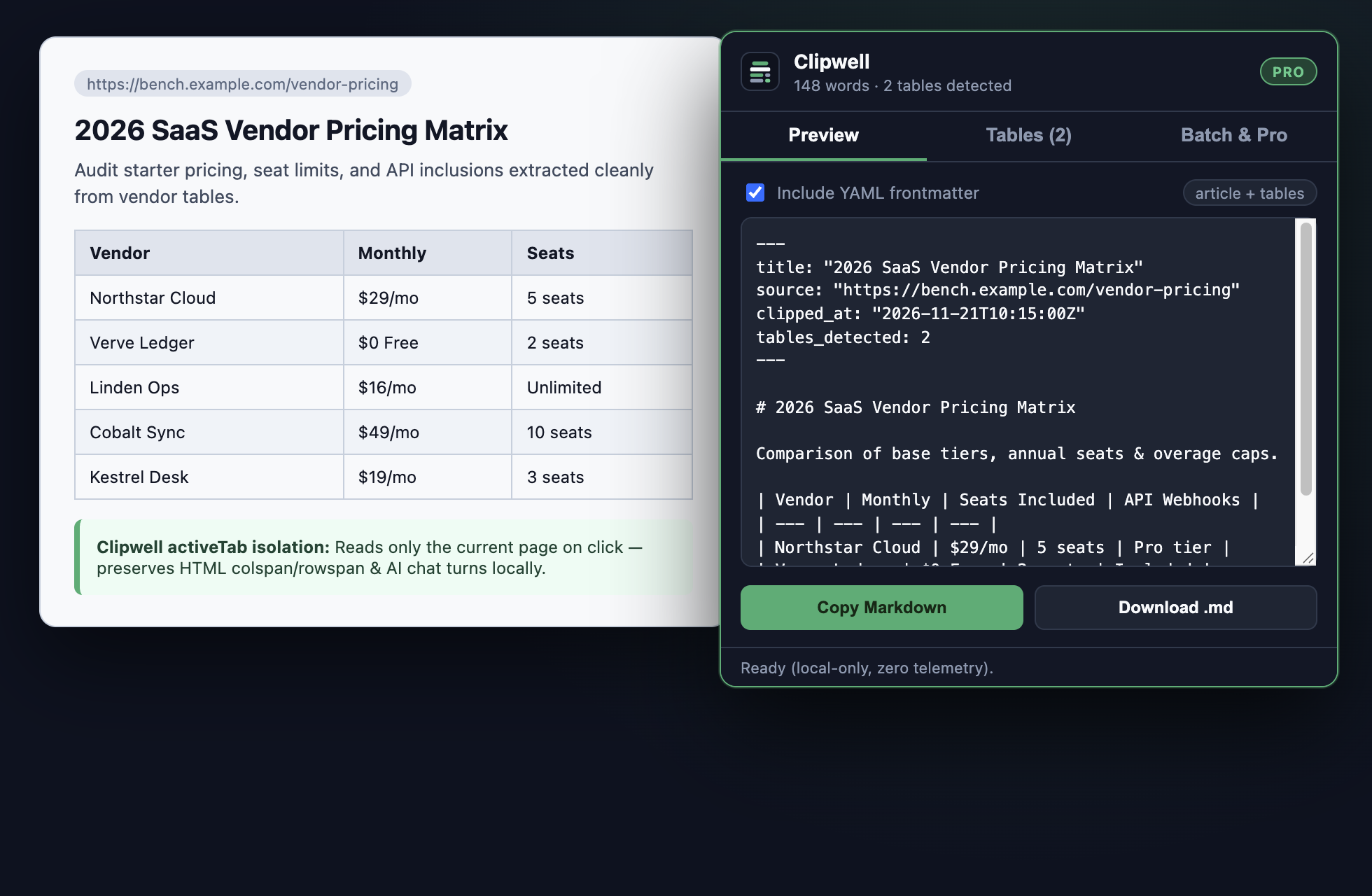
Clipwell Chrome extension extracting a vendor pricing matrix into clean Markdown with YAML frontmatter and intact pipe tables
Architecture & Craft

Engineered for Technical Docs, Messy Grids & AI Research

Every parser runs in-memory inside your browser popup so internal dashboards, vendor matrices, and private AI prompts never leave your machine.

HTML & ARIA Grid Engine

Merged colspan & rowspan Tables Stay Rectangular

Standard web clippers shatter multi-header pricing tables and ARIA [role="grid"] widgets. Clipwell resolves spanned cells into aligned GFM Pipe Markdown, one-click Google Sheets TSV, or RFC 4180 CSV.

| Vendor         | Monthly | Seats    | Notes                     |
| -------------- | ------- | -------- | ------------------------- |
| Northstar Ops  | $29/mo  | 5 seats  | Escapes literal \| pipes  |
| Local Runtime  | $0 Free | Unlimited| Zero remote page upload   |
Least-Privilege Security

Zero <all_urls> Host Access

Uses Chrome Manifest V3 activeTab + scripting exclusively when you click the toolbar icon. Zero background service-worker scraping, zero analytics SDKs, and zero remote DOM uploads.

"permissions": [
  "activeTab", "scripting", "storage"
]
Obsidian & Notion Ready

AI Chat Turn Separation

Automatically detects ChatGPT and Claude conversation structure, separating prompts and answers under clean ### User and ### Assistant headings with YAML metadata.

Clipwell Pro Workflow

Multi-Page Research Clip Queue & Batch Table Export

Queue up to 50 articles, API docs, and AI threads incrementally across tabs into chrome.storage.local and export one unified Markdown dossier, or batch-export every table on a dense benchmark page in 1 click.

Structured Frontmatter

YAML Metadata & Deterministic Timestamps

Toggle automatic title, canonical source URL, ISO-8601 clipped_at timestamp (), and detected table count at the top of every note.

Companion Web Utility

Zero-Install Browser Table Cleaner

Working on a locked-down guest browser or cleaning raw CSV/TSV snippets? Use our client-side CSV, TSV & HTML Table Cleaner with identical colspan normalization.

Simple Lifetime Licensing

Generous Free Core. One-Time $29 Pro Upgrade.

No recurring SaaS fatigue, no cloud account lock-in, and no seat telemetry.

Clipwell Free $0 forever

Complete single-tab clipping for daily engineering docs, spreadsheets, and AI notes.

  • Unlimited active-tab Markdown preview, copy & .md download
  • Optional YAML frontmatter (title, URL, ISO timestamp, table count)
  • Single HTML/ARIA table export to Google Sheets TSV, CSV & Markdown
  • ChatGPT & Claude conversation turn separation
Add to Chrome — FreeAdd to Edge — Free
Clipwell Pro Lifetime $29 one-time

Multi-tab research dossiers and full-page batch table extraction via Polar.sh.

  • Everything in Clipwell Free with zero recurring fees
  • Up to 50 pages per Research Clip Queue dossier → export 1 combined Markdown bundle
  • Batch Export All Tables on the active page in 1 click
  • Up to 5 concurrent devices per license key + 7-day offline grace
  • 14-day full refund guarantee via Polar (email lhphong09t2@gmail.com with your order receipt within 14 days; license key deactivated upon refund).
Unlock Pro Lifetime — $29

Swipe horizontally to compare all columns →

Capability Clipwell Free ($0) Clipwell Pro ($29 Once) Privacy & Execution Boundary
Active-Tab Article → Clean Markdown + YAML Unlimited Unlimited 100% local DOM via activeTab
HTML <table> & ARIA Grid Normalization Single selected table (TSV, CSV, MD) Single + Batch Export All Tables Preserves colspan & rowspan in memory
ChatGPT & Claude Thread Turn Formatting Included (### User / ### Assistant) Included + Multi-Thread Queue Zero remote transcript upload
Multi-Page Research Clip Queue Dossier Single active page Up to 50 pages per Research Clip Queue dossier Stored locally in chrome.storage.local
One-Click Batch Export All Page Tables Table-by-table selector All detected tables in 1 click Local Markdown & table serializer
Concurrent Browser / Device Activations Unlimited browsers Up to 5 concurrent devices per key Self-serve Polar Customer Portal key
Offline Resilience & Grace Window 100% offline 12h revalidation + 7-day offline grace HTTPS to api.polar.sh only when keyed
Billing & Ownership Model $0 Free forever $29 one-time lifetime license Stripe-backed checkout via Polar.sh
Instant Activation

Unlock Pro in 3 Steps (< 30 Seconds)

No account password or cloud login inside the extension — activate directly with your Polar license key.

1

Install Free from Chrome Web Store

Click Add to Chrome — Free and pin Clipwell to your browser toolbar for one-click access on any tab.

2

Get Your Polar License Key

Complete the one-time $29 checkout on Polar.sh (FlowBench Lab) to receive your key immediately onscreen and by email.

CLIP-XXXX-XXXX-XXXX
3

Paste in Batch & Pro → Activate

Open the Clipwell popup, switch to the Batch & Pro tab, paste your CLIP-XXXX-XXXX-XXXX key, and click Activate (valid on up to 5 devices).

Technical FAQ

Permissions, Table Parsing & Licensing Details

Transparent answers for security-conscious engineers, analysts, and researchers.

Why does Clipwell use activeTab instead of broad all-sites permissions?
Extensions requesting <all_urls> can read banking, email, and internal admin tabs silently in the background. Clipwell uses Chrome's activeTab + scripting model so it cannot inspect any webpage until you explicitly click the Clipwell icon on that tab.
How does Clipwell handle complex HTML tables with colspan, rowspan, or ARIA roles?
Clipwell constructs an in-memory 2D occupancy grid that expands merged colspan and rowspan cells, flattens internal <br> line breaks, and escapes literal | characters so tables paste cleanly into Notion, Obsidian, GitHub GFM, Excel, and Google Sheets.
How many computers can I activate with one CLIP-XXXX-XXXX-XXXX Pro key?
Every $29 Clipwell Pro Lifetime key includes up to 5 concurrent browser profile activations across macOS, Windows, and Linux.
Does Clipwell work offline or on flights?
Yes. Clipwell Free triggers zero network requests at all times. Clipwell Pro caches validation locally in chrome.storage.local, revalidating once every 12 hours when online with a full 7-day offline grace window.
Is Clipwell Pro a recurring subscription?
No. Clipwell Pro is a $29 one-time purchase processed securely via Polar.sh (Stripe) with lifetime v1.x updates included.
What is the refund policy for the $29 Pro license?
14-day full refund guarantee via Polar (email lhphong09t2@gmail.com with your order receipt within 14 days; license key deactivated upon refund).

Need License Help, Team Invoicing, or Table Parser Support?

Published by FlowBench Lab. Email lhphong09t2@gmail.com for direct engineering support or watch step-by-step table & research workflows on YouTube (@FlowBenchLab).